
- Published on
High-Fidelity Design: PicTok App
- Authors

- Name
- Sierra Laurent
Climbing Road Blocks
After a solid couple of weeks, everything was starting to slow down, just a continuation of the high-fidelity design on the Figma for the app and its features continued with everyone hard at work. However, there was still almost no sign of hearing back from the accessibility center of BCIT about speaking to the visually impaired students to gain insights for our app. We continued to gather bits and pieces of information from other sources to learn how an app should work and behave for the visually impaired.
High-Fidelity Layout
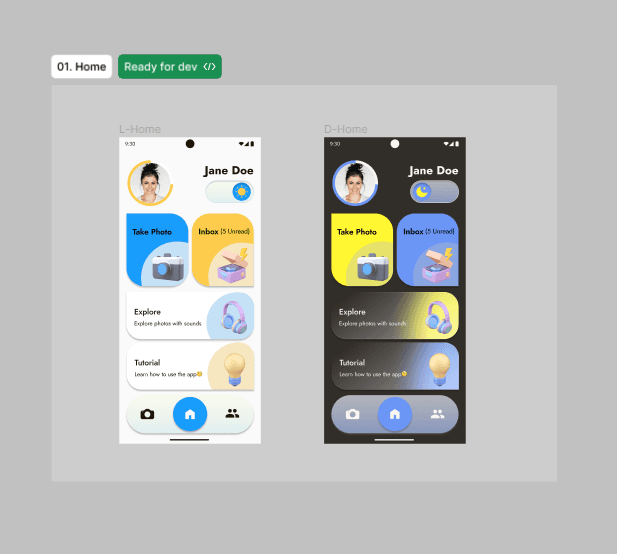
The design team has had experience with using figma for some time now, so no blocks there with the completion or any technical bumps. Everyone continues to work hard on the layout, following the design team lead, Sebin’s instructions.
Atoms -> Molecules -> Organisms
Using the "atoms -> molecules -> organisms" methods for creating components helps vastly with organization and undertaking which components should go where. It will also help greatly for development so nothing has to be made twice or there won't be one-off components created. Having 2 design team members work on creating these leaves them at use for everyone and keeps consistency with branding and design.
Accessibility is Priority #1
Consistent and frequent use of the accessible plugins for figma is important as not only do you want to create an accessible app for everyone, but our main focus is for the visually impaired, a market that encounters inaccessibility for many things, including apps almost every day. Contrast checkers, text size checkers and talk-back features are important during design and development to keep the app useful and enjoyable for the target user.
Continuation
The design team continues to work on the high-fidelity mock-up on figma and correct and issues that may arise that may stop the users from enjoying the experience of the PicTok app.